Sunday, May 5, 2013
House Warming - Sparrow moves in!
A few days ago I noticed that a sparrow has moved into the log cabin bird house! I really never anticipated this to happen since the log cabin bird house has been up there for 4 years now with no occupants!
She's a chirpy little thing and probably chose that location due to the proximity of the bird feeder :)
Saturday, March 23, 2013
St. Patrick's Day Fun
Thursday, February 28, 2013
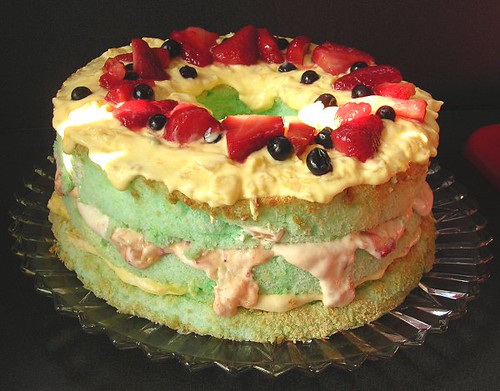
Angel Food St Pat's Day Desert
Here's a yummy St Patrick's desert!
I started with a boxed angel food cake and cooked it according to the box directions while adding a splash of vanilla and almond extract to the batter and some green food coloring for this St Patty's day desert. The topping is basically whipped cream, crushed pineapple and vanilla instant pudding then I added some strawberries to one layer and blueberries to another. Top it with strawberry slices and blueberries. This was a big hit when I made it before!
Monday, February 11, 2013
Traveling Double Diamonds Chart
Here's a chart for the Traveling Double Diamonds pattern. The chart was made and shared by Ravelry member, IllinoisHawkeye!
Download it through DropBox or Google Drive.
Looking for the entire pattern? You can find my Traveling Double Diamonds modifications in the folders I linked to above or you can download the original from LionBrand or check out the Ravelry knitter's pictures and notes.
I have not knit the throw by this chart so I cannot say if if is completely accurate or not.
Download it through DropBox or Google Drive.
Looking for the entire pattern? You can find my Traveling Double Diamonds modifications in the folders I linked to above or you can download the original from LionBrand or check out the Ravelry knitter's pictures and notes.
I have not knit the throw by this chart so I cannot say if if is completely accurate or not.
Monday, February 4, 2013
Taxes: Utilizing Etsy's CSV
It's tax time again! (Boo!) We're always looking for some way of making our lives easier and goodness knows the calendar pages flip quickly to tax time. I put together this excel workbook to hopefully help others selling on Etsy.
The spreadsheet will break the data into usable information regarding sales, shipping, tax and I even included a little calculator to help others that have to pay their use tax for sales in their own state.
Download the 97-2003 excel .XLS file
Download the 2010 excel file .XLXS file.
Download the .XLSM file
I'm not sure of the best file type so I made 3 versions available. If it doesn't work, email me and I'll send you the file! DetroitKnitter@Gmail.com.
The workbook you just downloaded has 2 worksheets, "Etsy Orders" and "Etsy Summary". You get to one sheet or the other by way of the tabs on the bottom of the Excel page. Go ahead and open the workbook and take a look at the worksheets. I put some data on the Orders page so you could see what it looks like - DELETE THAT DATA BEFORE PASTING YOUR OWN (sorry, didn't mean to scream)
Now we need to get your CSV into the Order sheet. For this you will need to download the CVS for the year from Etsy. To get to the download page go to "options" on the left side bar then click the "Download Data" tab.
Go ahead and select "orders" from the CSV drop down box and only select 2012 then click the "Download CSV" button. Don't forget where you saved the file!
Open the file you just saved. Click your mouse on the number 1 on the left side and the entire row is highlighted. Click and drag your mouse all the way from the top row to the bottom row so that the entire row of data is highlighted.
Right Click. "Copy".
Go to the my Etsy CSV Summary worksheet and on the Orders tab you will click the top left 1 highlighting that row then.
Right click. "Insert Copied Cells"
If your sheet still had data on it, just click and drab over it and delete it; you'll have to go back to the downloaded data and stat the copy/insert over again.
The SUMMARY page will incorporate your personal data.
I do hope this information proves useful!!!
The spreadsheet will break the data into usable information regarding sales, shipping, tax and I even included a little calculator to help others that have to pay their use tax for sales in their own state.
Download the 97-2003 excel .XLS file
Download the 2010 excel file .XLXS file.
Download the .XLSM file
I'm not sure of the best file type so I made 3 versions available. If it doesn't work, email me and I'll send you the file! DetroitKnitter@Gmail.com.
The workbook you just downloaded has 2 worksheets, "Etsy Orders" and "Etsy Summary". You get to one sheet or the other by way of the tabs on the bottom of the Excel page. Go ahead and open the workbook and take a look at the worksheets. I put some data on the Orders page so you could see what it looks like - DELETE THAT DATA BEFORE PASTING YOUR OWN (sorry, didn't mean to scream)
Now we need to get your CSV into the Order sheet. For this you will need to download the CVS for the year from Etsy. To get to the download page go to "options" on the left side bar then click the "Download Data" tab.
Go ahead and select "orders" from the CSV drop down box and only select 2012 then click the "Download CSV" button. Don't forget where you saved the file!
Open the file you just saved. Click your mouse on the number 1 on the left side and the entire row is highlighted. Click and drag your mouse all the way from the top row to the bottom row so that the entire row of data is highlighted.
Right Click. "Copy".
Go to the my Etsy CSV Summary worksheet and on the Orders tab you will click the top left 1 highlighting that row then.
Right click. "Insert Copied Cells"
If your sheet still had data on it, just click and drab over it and delete it; you'll have to go back to the downloaded data and stat the copy/insert over again.
The SUMMARY page will incorporate your personal data.
I do hope this information proves useful!!!
Monday, December 31, 2012
Saving Ink and Paper (HP Officejet 6500)
Whether you sell online or like to print online information, you've probably thought twice about clicking the print button or contemplated if you should or should not include a receipt in the order. As an online seller I totally advocate going green, but in reality most people expect to get a receipt with their order. Some sellers figure if the customer wants one they can print it themselves; well, not all buyers have printers (I find it hard to believe, but yes, there are printer-less people in this world!) As a buyer, I am put off by having to print my own receipt with my own ink and consider this to be a cost of doing business; a burden which should be upon the seller in my opinion.
Ink and paper cost money, but one thing you can do is reduce the use of both by taking advantage of the features on your printer. This little tutorial type explanation is based on my own personal settings and printing habits with my HP Officejet 6500, but I'm sure in this day and age most modern printers have some sort of ink saving features that are well worth looking over. I've had this particular HP for 2+ years. I print everything for my online shop on it - and I mean everything; iron on inkjet sheets, transfer paper, freezer paper, card stock and of course regular office paper. This printer has served me well!
I print the receipts so they only take up 1/2 of a sheet of paper and I reduce the ink. I have the setting saved so all I have to do when I want to print a customer's receipt is hit "print", select "properties" and in the "printer shortcuts" tab I select that setting. Here, I'll show you (click on the picture if you need to see it bigger)...
In this photo above I'm on the "Features" tab. I got to this tab after selecting "print" and then the "properties" tab. On the right side are paper saving options. I've circled in red where I selected the 2 pages per sheet and left then down for the page order options. After you select 2 pages per sheet, you will see the paper set up icon (blue arrow) change. Select your desired "Print Quality"; I want my customer to get a decent looking receipt so I select "normal", BUT I turn down the ink which I will show you next.
In this picture, I am now on the "Advanced" tab. The "Ink Volume" is by default on Automatic. Clicking on the Automatic button allows you to select "change" (labeled as 1. above). By selecting "Change" a second "Change" box appears and when you click it a little window with a slider opens allowing you to further manipulate the amount of ink you use for that print job. I slide it to the lightest setting.
If, after you've made these change you want to save these settings to use for future print jobs, go back to the "Printing Shortcuts" tab and at the bottom click "Save Setting". A window opens for you to name your setting.
So now, as shown in the last picture, I have saved those settings for future use! I've been printing a 1/2 page receipt for myself too for which I set the print quality to fast draft and again turned the ink volume all the way down.
FINAL NOTE: to print 2 receipts per page, after the first one prints reinsert the paper blank side first. I print both my receipt and my customer's on one page then cut them on my cutting board. PayPal receipts will print with the paper already cut in half, but I can't seem to get my Etsy receipts to do that so I have to print them on one page then cut them.
Looking for more ways to use the paper the receipt is printed on? I cut the blank strip at the bottom off and use it to make my matchbook style "thank you" memo pads. The customer's receipt doubles as a place to write a short thank you message.
Ink and paper cost money, but one thing you can do is reduce the use of both by taking advantage of the features on your printer. This little tutorial type explanation is based on my own personal settings and printing habits with my HP Officejet 6500, but I'm sure in this day and age most modern printers have some sort of ink saving features that are well worth looking over. I've had this particular HP for 2+ years. I print everything for my online shop on it - and I mean everything; iron on inkjet sheets, transfer paper, freezer paper, card stock and of course regular office paper. This printer has served me well!
I print the receipts so they only take up 1/2 of a sheet of paper and I reduce the ink. I have the setting saved so all I have to do when I want to print a customer's receipt is hit "print", select "properties" and in the "printer shortcuts" tab I select that setting. Here, I'll show you (click on the picture if you need to see it bigger)...
In this photo above I'm on the "Features" tab. I got to this tab after selecting "print" and then the "properties" tab. On the right side are paper saving options. I've circled in red where I selected the 2 pages per sheet and left then down for the page order options. After you select 2 pages per sheet, you will see the paper set up icon (blue arrow) change. Select your desired "Print Quality"; I want my customer to get a decent looking receipt so I select "normal", BUT I turn down the ink which I will show you next.
In this picture, I am now on the "Advanced" tab. The "Ink Volume" is by default on Automatic. Clicking on the Automatic button allows you to select "change" (labeled as 1. above). By selecting "Change" a second "Change" box appears and when you click it a little window with a slider opens allowing you to further manipulate the amount of ink you use for that print job. I slide it to the lightest setting.
If, after you've made these change you want to save these settings to use for future print jobs, go back to the "Printing Shortcuts" tab and at the bottom click "Save Setting". A window opens for you to name your setting.
So now, as shown in the last picture, I have saved those settings for future use! I've been printing a 1/2 page receipt for myself too for which I set the print quality to fast draft and again turned the ink volume all the way down.
FINAL NOTE: to print 2 receipts per page, after the first one prints reinsert the paper blank side first. I print both my receipt and my customer's on one page then cut them on my cutting board. PayPal receipts will print with the paper already cut in half, but I can't seem to get my Etsy receipts to do that so I have to print them on one page then cut them.
Looking for more ways to use the paper the receipt is printed on? I cut the blank strip at the bottom off and use it to make my matchbook style "thank you" memo pads. The customer's receipt doubles as a place to write a short thank you message.
Sunday, December 16, 2012
Shipping ETA - the USPS cost calculator
This time of year, shoppers get a little frantic trying to complete their Christmas shopping and yet still want to purchase gifts online AND get them by Christmas! It happens every year and this year is no different.
Now of course you need to know WHEN your order will ship and from WHERE. I generally ship the day following the placement of an order.
Here is the USPS postage and ETA calculator - remember that at Christmas time it might take the postal people an extra day or even two to get the high volume of packages delivered.
Below are a few visuals to help you out (click on the pics to enlarge)... In this example I will ship a package to zip code 89509 in Reno, Nevada on December 17th. Since I'm shipping everything Priority after the 17th, the post office is indicating an ETA is the 19th. That seems a little fast for the Christmas rush doesn't it? I'll see how long it takes by the delivery confirmation. So far all of my shipments have arrived earlier, on time or within 1 day after the ETA shown using this calculator. My post office system is terrific here in Detroit; remote areas experience delays though.
After you click "continue", you'll get a new screen with shipping options and prices. I circled the ones I use the most.
Happy Holidays!
Marlene
DetroitKnitter
Now of course you need to know WHEN your order will ship and from WHERE. I generally ship the day following the placement of an order.
Here is the USPS postage and ETA calculator - remember that at Christmas time it might take the postal people an extra day or even two to get the high volume of packages delivered.
Below are a few visuals to help you out (click on the pics to enlarge)... In this example I will ship a package to zip code 89509 in Reno, Nevada on December 17th. Since I'm shipping everything Priority after the 17th, the post office is indicating an ETA is the 19th. That seems a little fast for the Christmas rush doesn't it? I'll see how long it takes by the delivery confirmation. So far all of my shipments have arrived earlier, on time or within 1 day after the ETA shown using this calculator. My post office system is terrific here in Detroit; remote areas experience delays though.
After you click "continue", you'll get a new screen with shipping options and prices. I circled the ones I use the most.
Happy Holidays!
Marlene
DetroitKnitter
Friday, October 19, 2012
Are You? If you are On-On this race if for you!
Word has it from a very reliable source that hashers will be on the course as runners as they make the final stretch on Atwater. Looking for the on-after? McShane's at 1460 Michigan Ave in Corktown will be the place to reload your carbs and begin your recovery. Other race news...
• Some stats: Last year, the event surpassed 20,000 participants for the first time. This year, that number should reach 24,000, according to race organizers, and the event was declared a sellout in August.
Detroit has the only marathon in North America that includes two international border crossings and Detroit has the only Underwater Mile in distance racing.
Marathon & Beyond magazine included Detroit in its ranking of the Top 25 finisher medals for North American marathons. Competitor magazine included Detroit when picking its 26 most memorable miles from marathons across the country. The magazine called the mile over the bridge as "more scenic" but the mile through the tunnel the "more memorable." Rodale Publishing (parent of Runner's World magazine) selected Detroit as one of its 10 best events for first-time marathoners.
This year's field includes runners from all 50 states and 16 countries. About 85% of the runners live in Michigan. The average runner is 38 years old, about the national figure for distance races. The field is 57% female.
• The addition: The event started its exponential growth when a half marathon was added in 2004. The 13.1-mile half always has covered the first part of the marathon course, which starts downtown, crosses the bridge, returns through the tunnel, snakes through Corktown and finishes downtown.
This year, a half marathon has been added that will cover the back part of the marathon course. It features a later start time -- at 11 a.m., four hours after the main gun -- and stays strictly on U.S. soil. The highlights include the RiverWalk, Belle Isle and Indian Village, with its enthusiastic crowds.
• The bridge: For years, the Gateway Project has put a construction squeeze on runners while crossing into Canada. Last year, runners had more room on the bridge, from a 10-foot to a 22-foot-wide lane, after the Detroit International Bridge Co. finished redecking the 83-year-old structure. This year, with more ramps and access roads open in the Gateway Project, runners should face far less congestion and far less vehicle traffic approaching the bridge.
In one section, for about a quarter-mile, runners were on the gravel and dirt Bait Shop road, bordered by a fence and squeezed into a 12-foot-wide lane. Bill Ewing, operations director, said the course now could utilize paved access roads, have more room (at least 30-foot lanes), enter through new tollbooths and take a more direct route from the plaza onto the bridge.
The latest news
• The app: Before the 2011 event, Detroit became the first major race with a smartphone app. This free app, recently updated and enhanced, can be used to register for events, check course maps, view aid stations, read FAQ's, search results, see photos and track runners during the races. To download the app, search for "Detroit Marathon" in the iTunes Store or Android Market.Parking
With thousands of runners, volunteers and spectators rushing downtown in the dark, parking and logistics for many people can turn into a mad dash to the starting line. That's because countless runners each year do not arrive early enough, then must battle traffic and congestion, hunt for parking and line up for a Porta-John.Still, runners should try to get downtown by 5:30 a.m., or 90 minutes before the starting gun. Some streets start to close as early at 6 a.m.
The start (and finish) again will be at Fort and Second streets, near the Free Press building and Doubletree Hotel. Because this area is a hop, skip and a jump from the Lodge Freeway, the exits for Bagley, Howard and Jefferson will be traffic magnets. So think outside the jam.
Race organizers have partnered with Detroit Municipal Parking and Olympia Entertainment again for a wide selection of 20 parking options near the start/finish line at $3, $5 and $7. Other private lots will be available. (Detailed maps can be found at the race website and at the information booth at the race expo.) Parking locations include Joe Louis Arena, Grand Circus Underground Garage, Premier Underground Garage and lots off Sixth Street between Lafayette and Porter.
Most lots will open at 4:30 a.m. and all by 5 a.m. The People Mover will begin working at 5 a.m., too, so parking far from the start and taking a ride could be a convenient option. The closest stations to the start area are Michigan Avenue, Fort/Cass and Cobo Center.
Contact Gene Myers: 313-222-6736 or gmyers@freepress.com . Follow him on Twitter @genemyers.
More Details: In the long run
What: 35th Detroit Free Press/Talmer Bank Marathon.When: 6:58 a.m. next Sunday.
Where: Streets of Detroit and Windsor. Marathon starts and ends downtown at Fort and Second, near the Free Press building and Doubletree Hotel.
Schedule:
6:58 a.m. — Disabilities division.Afterglow: Conquered: The Official Marathon Afterparty, on Lafayette between Third and Lodge Service Drive (one block north from finish), 9 a.m.-2 p.m. No charge. Open to all entrants and the general public. Music from Larry Lee (a former Lion) and the Back in the Day Band. Local food truck favorites Dago Joe’s, Jacques’ Tacos, People’s Pierogi Collective and Green Zebra. Interactive games, face painters, balloon twisters and photo booth. Official race merchandise tent. Beer sales start at noon.
7 a.m. — Marathon, international half marathon, relay (wave start in which groups go off in two-minute intervals).
7:25 a.m. — 5K run/walk (start on Lafayette at Washington).
11 a.m. — U.S. half (start on Congress at Beaubien).
Field: Expected to hit 24,000, up from last year’s record of 20,940. In 2000, the event drew 3,588 participants.
Race records:
Men — Greg Meyer, Grand Rapids, 2:13:07, 1980.Information: Click on freepmarathon.com. Follow the latest updates on the race’s Facebook page and through Twitter.
Women — Elena Orlova, Russia, 2:34:16, 2004.
Mark your calendar: The 36th Detroit Free Press/Talmer Bank Marathon will be Sunday, Oct.?20, 2013. Registration opens Jan.?1.
More Details: The sideshow
What: Health and Fitness Expo, home for runner packet pickup and featuring more than 90 exhibitors with the latest in running apparel, footwear, technology and nutrition.When: 3-8 p.m. Friday and 10 a.m.-7 p.m. Saturday.
Where: Cobo Center, downtown Detroit.
Admission: Free.
Packet pickup: All races are sold out. Marathon, half and relay entrants must pick up race packets at the expo. Race-day pickup is not available. Entrants in 5K events can pick up packets at the expo or 6-7:15 a.m. on race day at the corner of First and Lafayette. If crossing the border — that’s everybody in the marathon, international half and relay legs Nos.?1 and 2 — you cannot pick up your race packet without a passport, passport card or enhanced driver’s license. Runners for the U.S.-only half, relay legs Nos.?3-5 and 5K run/walk need only photo identification.
Saturday, July 14, 2012
Boob Scarf to be on the Today Show!
A rep from NBC emailed earlier in the week inquiring if I could send them a few of my Neck Knockers Boob Scarves for a segment they are doing called "Things that make you go hmmmmm" on the Today Show with Kathie Lee and Hoda.
Ummmm, YES! Of course I can send you a few scarves! So off I sent 4 scarves in each of the colors I make to the NBC studio in NY, NY. The show airs on Monday, July 16th.
I have no idea how many orders I'll get... will it be a few or will I be pulling my hair out? I did put some caps on the quantities available on my boobscarf.blogspot.com page and I lowered the number on eBay.
Ummmm, YES! Of course I can send you a few scarves! So off I sent 4 scarves in each of the colors I make to the NBC studio in NY, NY. The show airs on Monday, July 16th.
I have no idea how many orders I'll get... will it be a few or will I be pulling my hair out? I did put some caps on the quantities available on my boobscarf.blogspot.com page and I lowered the number on eBay.
![]() |
| Here are the contents of the box I sent to NBC. Most of these had nipple rings which you can't see in this photo - one has a large ring. Note the pink ribbon applique is new! |
Sunday, June 17, 2012
Cutting Table Design Stage
I bought a folding cutting table from JoAnn's to cut my fabric on. The problem is that the table is pretty flimsy and really won't withstand years of pressing down hard on the far corners as when I'm cutting 4 layers of batting with my rotary cutter. Solution: build my own!
Here's my concept drawing. I did have to laugh when shopping for the connectors at the Depot when my DH told me my drawing doesn't resemble how I'm describing how the pieces will go together. Hmm... I think it looks pretty good! Ok, I can see where someone might think a few of those pieces aren't flush, but they are... just wait!
I call it a cutting table because that will be it's primary use, but this design can work easily as well for any kind of task table, hobby table, or work table it doesn't really matter what I call it so long as it's sturdy... and it will be!
Here's my concept drawing. I did have to laugh when shopping for the connectors at the Depot when my DH told me my drawing doesn't resemble how I'm describing how the pieces will go together. Hmm... I think it looks pretty good! Ok, I can see where someone might think a few of those pieces aren't flush, but they are... just wait!
I call it a cutting table because that will be it's primary use, but this design can work easily as well for any kind of task table, hobby table, or work table it doesn't really matter what I call it so long as it's sturdy... and it will be!
Sunday, May 13, 2012
It's been a while since I've actually listed a new pattern for my Swifter Reusables - they fit mops like the Swiffer WetJet and Libman. I've been catching up since Christmas followed by shortly after by a 2 week vacation. I'm not complaining, business is good and it's always nice to get away; it sure takes a while to get caught up again though!This is new pattern I just added to my Etsy and eBay shops. This is a paisley green top fabric (cotton) with teal terry cloth... actually the name of the terry is "Scuba Blue", but is pretty much teal. As always there is a middle layer of batting and of course it's handmade here in Detroit!
Saturday, May 5, 2012
3-Leaf Clover Chart
Sure it's a little late for St. Patrick's Day this year, but there are several reasons why someone may want to knit up a 3-leaf clover hot pad or dishcloth!I've been sitting on this for quite a while and in fact couldn't find the "actual" pattern I used for the hot pad I've pictured. I did find a chart that I could work from to create a new online chart.
The finished hot pad was created using "double knitting". It is a technique where you knit a double thick item, but you knit the front and the back at the same time in mirrored images of each other. It's a fun technique to learn and a simple chart like this is perfect for doing it.
I've uploaded the chart as a PDF in my Dropbox and as a PNG file in my Google Docs
---------------------
You can also view my entire shared Google Docs Folder and my Public Dropbox Folder
Friday, May 4, 2012
Michael Graves Prototype
![]() |
| Swifters: Michael Graves double-sided, washable pad prototype and scribblings of notes |
Monday, April 9, 2012
Re-Branding
Branding: a "Name, term, design, symbol, or any other feature that identifies one seller's good or service as distinct from those of other sellers."
I've always known that I needed to come up with my own branding for my reusable Swiffer style pads other than "reusable Swiffer style pads". I maybe pushing the trademark envelope here, but I've branded them as "Swifters". Actually all of my reusables fall under the "brand name" Swifters. I decided to do this mostly to make packaging easier :) I now have just one identifying tag that I use as a wrapper for all of them and then for each different style I have different information sheets that are included in the package. This is saving me quite a bit of time... and that's a good thing!
Here's the tag I designed that goes on the paper (kraft or scraps of card stock strips that I cut something else off of). I've been using the new tag exclusively now that I ran out of my old wrappers that had leaves all over them. My layout allows me to print 24 of these on 1 card stock page then I just cut them using my paper cutter.
Monday, March 12, 2012
Mush for a Cure 2012
Some crazy folks up in Minnesota participated in "Mush for a Cure" March 9-11, 2012. Despite what I'm sure was nippley condistions, together with their teams of dogs leading the way they "mushed" their way to raising $40,000 in support of breast cancer research!!
Nace, a very awesome photographer and entrepreneur, topped off his pink bathrobe ensemble with a Neck Knockers Boob Scarf. Looking good Nace....
Subscribe to:
Posts (Atom)